# What is Radius?
Radius is a design system meta framework to accelerate the creation of your design system. Radius makes it easier for teams and organizations to build a high quality, well adopted design system with a fraction of the effort. Radius is built atop the best elements in the industry and fills in the nascent gaps to provide an end-to-end solution out of the box.
Our goal is to simplify the path to a well adopted design system. Let's take a streamlined review of a few of the most critical pieces:
1. Figma Design Kit
2. Tokenization of the Design Kit
3. Coded Components
4. Tracking Design System Adoption
With Radius and ShadCN we have all of the above covered:
1. [Radius Design Kit](/products/radius-design-kit)
2. [Radius Token Tango](/products/radius-token-tango)
3. [Shadcn/ui](https://ui.shadcn.com/)
4. [Radius Tracker](/products/radius-tracker)
### Products
Radius Figma Design Kit v1.0
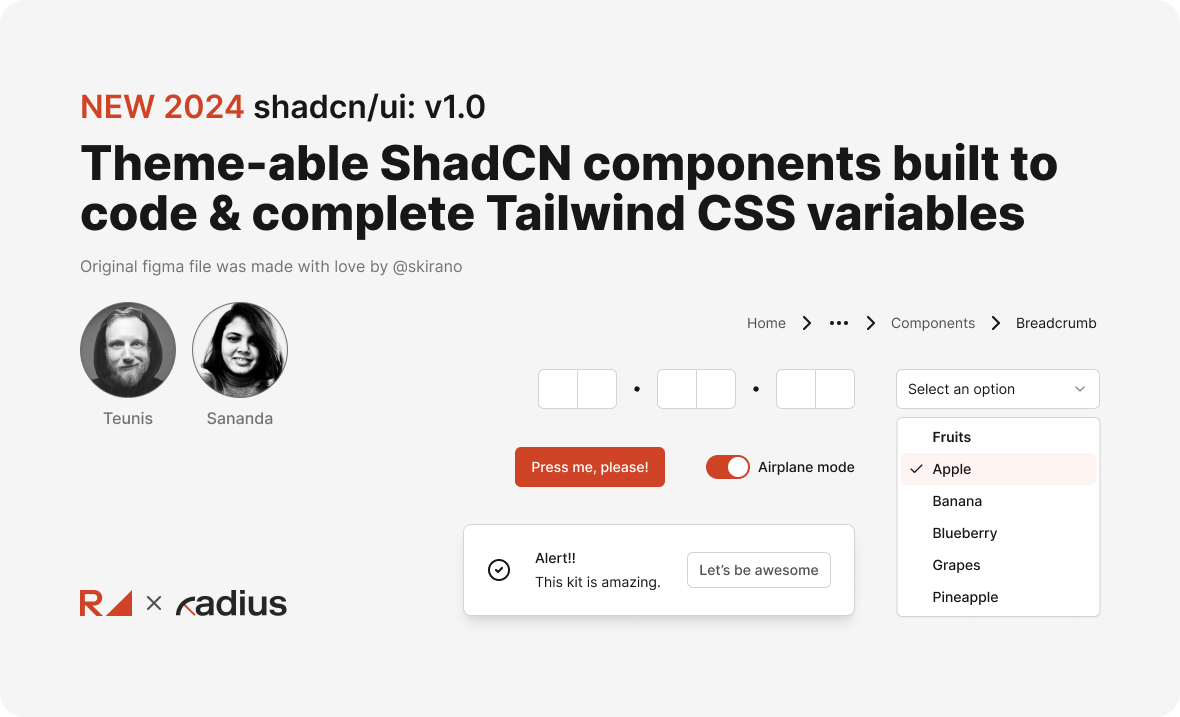
Our take on the renowned Shadcn component collection features themable components designed to integrate seamlessly with Tailwind CSS variables. More closer to code than ever.
### Learning. Curved.
Design Systems are a new way of working.
Finding your flow may take some time, but rest assured, we'll support you in any capacity. Our commitment lies in the "teach a man to fish" philosophy. Our goal is to equip you with the knowledge to thrive well beyond our time together. Our journey will be educational, inspirational, and transformational.[ **Let’s chat**](https://rangle.io/contact-us)
# Radius Design Kit
Theme-able shadcn/ui components built to code & complete Tailwind CSS variables
The Radius Figma Kit is the most up-to-date design kit based on [shadcn/ui](https://ui.shadcn.com/) and [Tailwind](https://tailwindcss.com/). The kit has been purpose-built to create a one-to-one relationship between Figma and coded components.
Features
* Themable out of the box using Figma Variables
* Figma Kit consistent with coded components
* Fully complete kit covering all available components
* Logically organized for efficient customization to your brand
### Get the Figma Design Kit
{% embed url="" %}
Get the Radius Kit
{% endembed %}
# Radius Token Tango
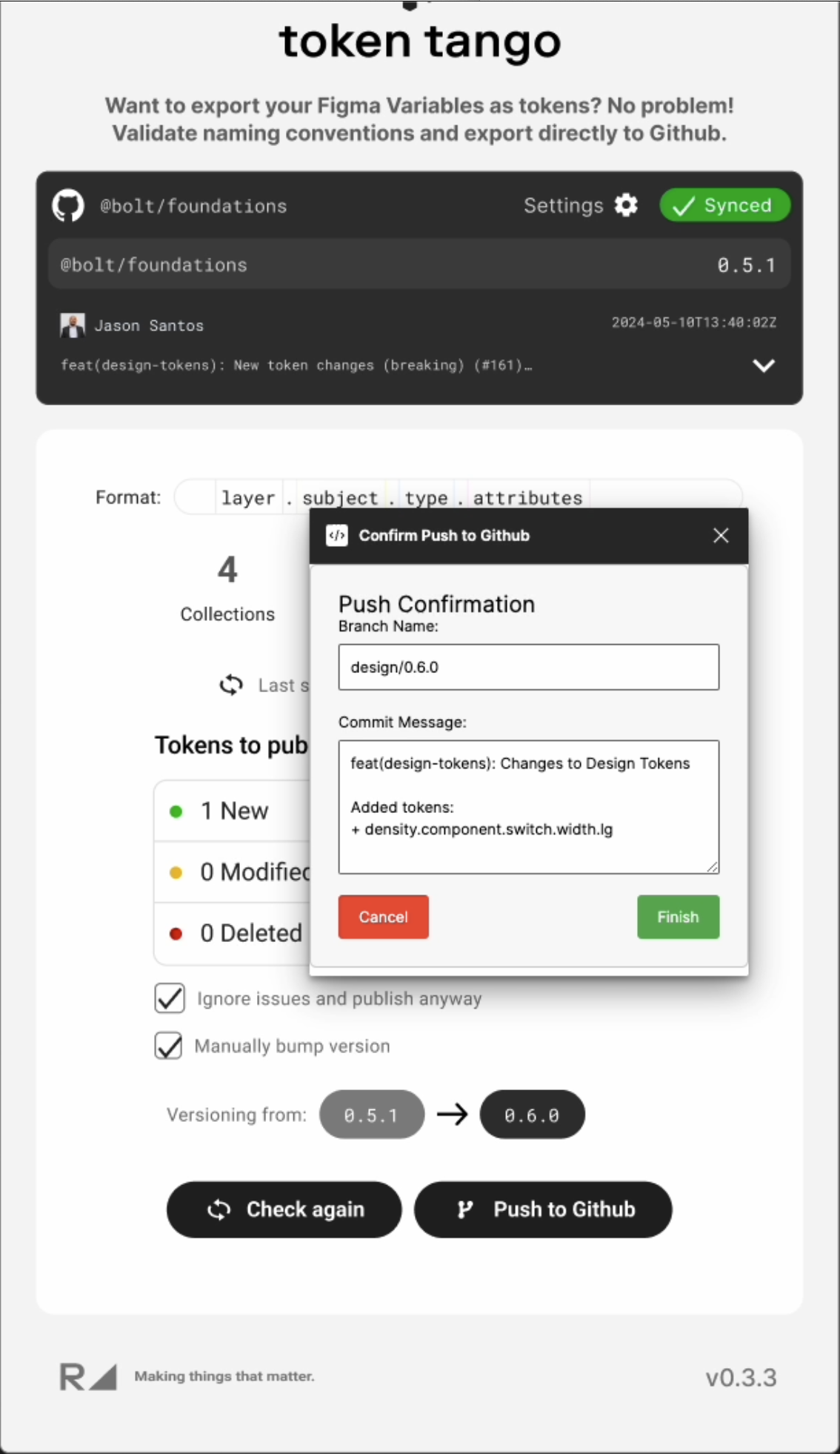
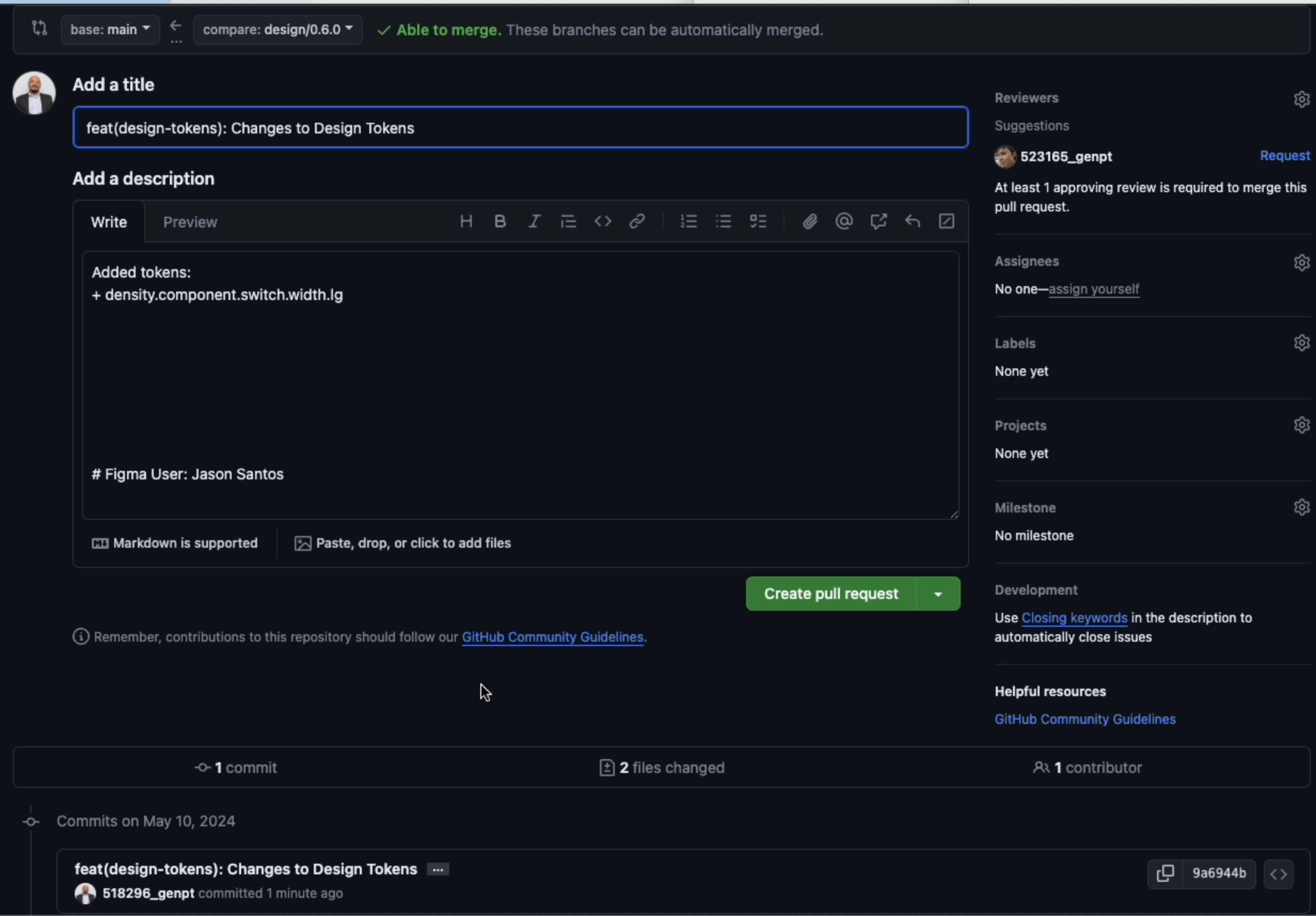
Token inspector & validator plus GIT semantic versioning, breaking change detection and GIT PR + GitHub Action!
Your token pipeline bridging the gap between the [Radius Design Kit](/products/radius-design-kit) and the coded [Shadcn](https://ui.shadcn.com/) components with [Tailwind](https://tailwindcss.com/).
Features
* Token inspection & validation
* Token automatic semantic versioning
* Auto notification of breaking changes (before push to Git)
* Git push and comment
* GitHub Action for pipeline
### Get The Figma Plugin
{% embed url="" %}
Get Token Tango!
{% endembed %}
### GitHub
{% embed url="" %}
Build with Tango!
{% endembed %}
#### Format Rules
{% embed url="" %}
Formating Rules
{% endembed %}
### Screenshots
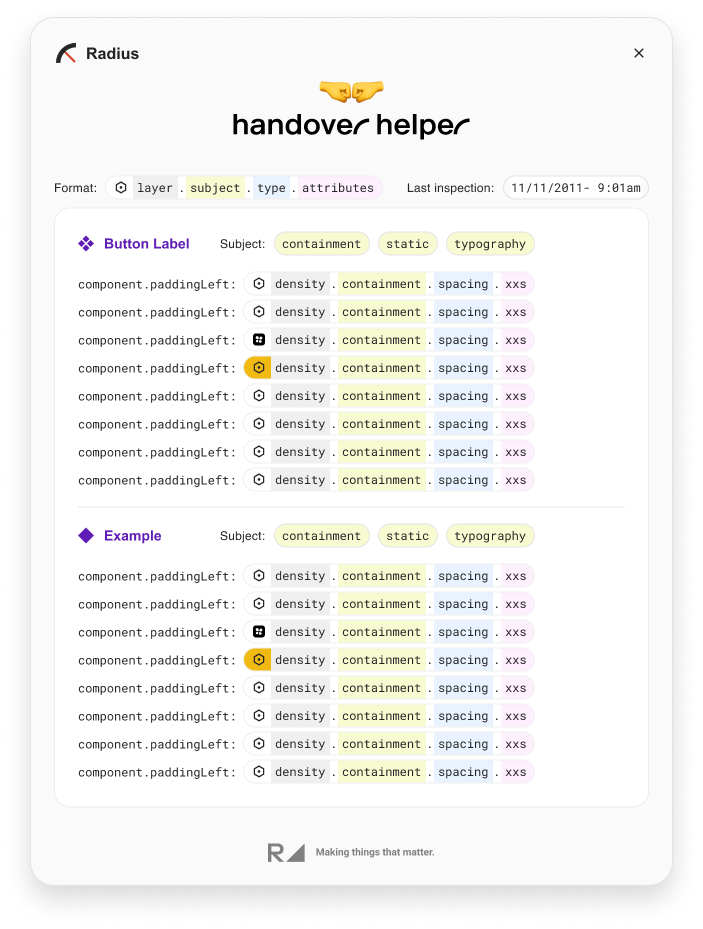
#### Token Inspect
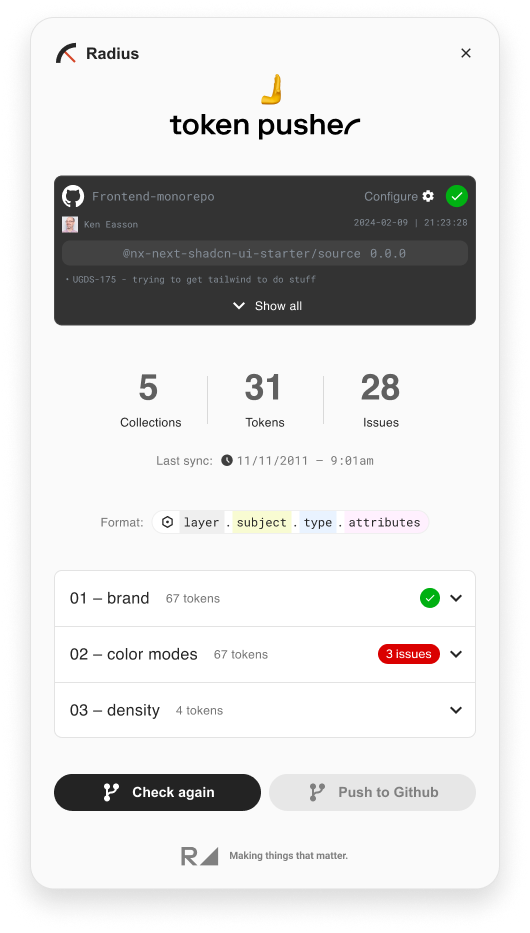
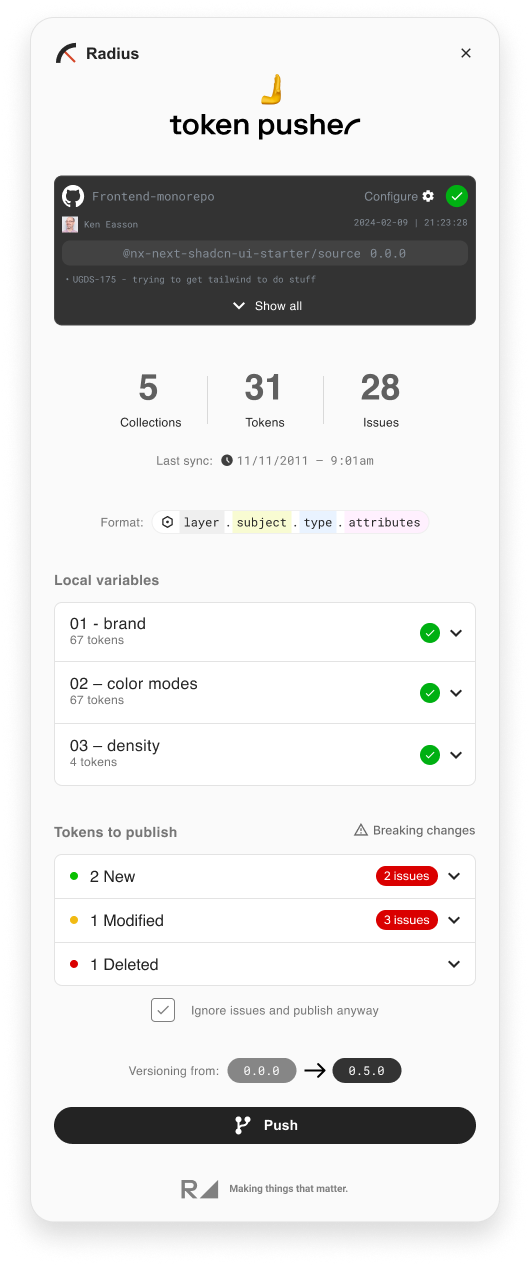
#### Token Push
No Errors + updated minor version
Token Validation Error + Breaking Change
#### Git PR & GitHub Action
# Radius Tracker
Track every use of every component in every code base in your company.
Radius Tracker generates reports measuring design system adoption, calculated bottom-up from individual component usage stats automatically collected from your organization repositories.
With diverse teams working on multiple projects and accessing various sources of components, it can be challenging to keep track of design system component usage - Radius Tracker is a cutting-edge solution designed to solve this by detecting every utilization of a component, regardless of its origin - throughout your entire organization.
With Radius Tracker, you can gain a comprehensive understanding of component usage, identify trends, and make informed decisions to streamline your UI ecosystem. Don't let valuable insights slip through the cracks – leverage the power of Radius Tracker today.
Radius Tracker operates independently, eliminating the need for network connectivity and ensuring maximum privacy and security. The entire report is just a collection of files, enabling easy customization and self-hosting, empowering companies to have complete control over their data without relying on external services.\
Being open source, users have the freedom to inspect and modify the code as needed, eliminating concerns about sharing proprietary information.
### Adoption
Radius Tracker is designed to measure the adoption of your design system. It compares use of design system components to custom, one-off "homebrew" components over time, which helps to identify and track missing features or the need for outreach or policies.
### Watch the demo
{% embed url="" %}
### Resources
Take a peek under the hood and see some of the resources Radius has to offer.
Run on GitHub
Learn how to create a GitHub Workflow and publish Tracker Reports on GitHub Pages
# CI Integration
There is more than one way to integrate the radius tracker into your CI pipeline. To keep things simple let’s break down the steps into three stages:
* Repository Access and Static Analysis
* Generating the report
* Publishing the report
### Repository Access and Static Analysis
For Radius tracker to analyze your repository it needs read access to the repository. On Github, a common way to provide access is via Personal Access Tokens (PATs); however, for automation and CI/CD processes, it is not recommended. A better approach is using a Github App to manage and grant permissions to CI/CD pipelines.
```yaml
jobs:
run-tracker:
runs-on: ubuntu-latest
steps:
- name: Checkout this repository
uses: actions/checkout@v4
```
The first step is to checkout the repository, note this is not the repository you want to track but the repository containing the global radius configuration. Next step is to retrieve the cache saved from the previous runs:
```yaml
jobs:
run-tracker:
runs-on: ubuntu-latest
steps:
- name: Checkout this repository
uses: actions/checkout@v4
- name: Restore cache for tracker
id: cache-radius-tracker
uses: actions/cache/restore@v4
with:
key: cache-radius-tracker-${{hashFiles('radius-tracker.config.js')}}
path: radius-tracker-cache
restore-keys: |
cache-radius-tracker-${{hashFiles('radius-tracker.config.js')}}
```
Note we are using a hash of the configuration file as a key for the cache. In addition we use the restore-keys to get the latest cache. This is because after each run we save a new copy of the cache (github does not allow updating the same cache). The next step is to execute the tracker based on the configuration in the repository we checked out earlier.
```yaml
- name: Run the tracker
run: |
npx radius-tracker timelines ./radius-tracker.config.js
```
This will generate a new file `usages.sqlite.gz` a gzipped sqllite containing the results from the new run and all previous histories. In addition the files under `radius-tracker-cache` is updated.
Finally we need to update our cache with the new changes and upload the database as an artifact to be used in the next job for generating the report.
```yaml
- name: Save cache for tracker
uses: actions/cache/save@v4
with:
key: cache-radius-tracker-${{hashFiles('radius-tracker.config.js')}}-${{github.run_id}}
path: radius-tracker-cache
- name: Upload database artifact
uses: actions/upload-artifact@v4
with:
name: tracker-database
path: usages.sqlite.gz
```
### Generating the Report
```yaml
build-static-site:
runs-on: ubuntu-latest
needs: run-tracker
steps:
- name: Download artifact
uses: actions/download-artifact@v4
with:
name: tracker-database
- name: Generate static site
run: |
npx radius-tracker report --database usages.sqlite.gz
- name: Upload static site artifact
uses: actions/upload-pages-artifact@v3
with:
path: radius-tracker-report/
```
In the snippet above we are taking advantage of Github pages to publish the report so it is easily accessible and does not require additional hosting. Please note this may not be ideal for all projects as github pages are public for personal or free accounts. The first step downloads the artifact generated in the previous step. To generate static site we simply execute `npx radius-tracker report --database usages.sqlite.gz` pointing to the database via the `--database` option.
Finally, we upload the generated folder using Github’s `actions/upload-pages-artifact` so we can deploy this to github pages in the next job.
{% hint style="info" %}
Before you can use github pages makes sure it is turned on for the repository. You can follow[ github’s documentation](https://docs.github.com/en/pages) to set this up before hand.
{% endhint %}
### Publishing the report
```yaml
deploy-to-github-pages:
runs-on: ubuntu-latest
needs: build-static-site
permissions:
contents: read
pages: write
id-token: write
environment:
name: github-pages
url: ${{ steps.deploy-pages.outputs.page_url }}
steps:
- name: Deploy to GitHub Pages
id: deploy-pages
uses: actions/deploy-pages@v4
```
In this example we are publishing to Github pages as mentioned earlier and the final job in the workflow file does that. It is only a single step since the actions/deploy-pages action already does the heavy lifting. The important parts are the permissions and environment . We need to grant the contents, pages and id-token permissions to the job to publish successfully. In the environment section we want to output the link to the published site hence we expose the page\_url output.
Putting all the parts together the final workflow file would look like this:
```yaml
name: run-tracker
on:
workflow_dispatch:
jobs:
run-tracker:
runs-on: ubuntu-latest
steps:
- name: Checkout this repository
uses: actions/checkout@v4
- name: Restore cache for tracker
id: cache-radius-tracker
uses: actions/cache/restore@v4
with:
key: cache-radius-tracker-${{hashFiles('radius-tracker.config.js')}}
path: radius-tracker-cache
restore-keys: |
cache-radius-tracker-${{hashFiles('radius-tracker.config.js')}}
- name: Run the tracker
run: |
npx radius-tracker timelines ./radius-tracker.config.js
- name: Save cache for tracker
uses: actions/cache/save@v4
with:
key: cache-radius-tracker-${{hashFiles('radius-tracker.config.js')}}-${{github.run_id}}
path: radius-tracker-cache
- name: Upload database artifact
uses: actions/upload-artifact@v4
with:
name: tracker-database
path: usages.sqlite.gz
build-static-site:
runs-on: ubuntu-latest
needs: run-tracker
steps:
- name: Download artifact
uses: actions/download-artifact@v4
with:
name: tracker-database
- name: Generate static site
run: |
npx radius-tracker report --database usages.sqlite.gz
- name: Upload static site artifact
uses: actions/upload-pages-artifact@v3
with:
path: radius-tracker-report/
deploy-to-github-pages:
runs-on: ubuntu-latest
needs: build-static-site
permissions:
contents: read
pages: write
id-token: write
environment:
name: github-pages
url: ${{ steps.deploy-pages.outputs.page_url }}
steps:
- name: Deploy to GitHub Pages
id: deploy-pages
uses: actions/deploy-pages@v4
```
### Private Repositories
In the previous sections we considered the case where all the repositories are public. However in most organizations repository are either private or internal (Github Enterprise), to account for this we need to make sure radius tracker can access this data. To modify the previous example to use private repositories we introduce a few more steps to setup access to private or internal repositories.
```yaml
jobs:
run-tracker:
runs-on: ubuntu-latest
steps:
- name: Checkout this repository
uses: actions/checkout@v4
- name: Generate token
id: generate-token
uses: actions/create-github-app-token@v1
with:
app-id: ${{ vars.RADIUS_APP_ID }}
private-key: ${{ secrets.RADIUS_ID_KEY }}
owner: ${{ github.repository_owner }}
- name: Add token to configuration
env:
GH_TOKEN: ${{ steps.generate-token.outputs.token }}
run: |
sed -i "s/github.com/$GH_TOKEN:$GH_TOKEN@github.com/g" radius-tracker.config.js
```
The first new step generates an access token. Here we are using a Github App to grant access to the private repository see [automating projects using actions](https://docs.github.com/en/issues/planning-and-tracking-with-projects/automating-your-project/automating-projects-using-actions).
In the second new step, we rewrite the repository urls using sed to add the token in the previous step. This change should allow the radius tracker to access the private repositories as long as the Github App is installed in the organization and it has been granted access to the target repositories in the radius configuration.
The new workflow file would look like the following:
```yaml
name: run-tracker
on:
workflow_dispatch:
jobs:
run-tracker:
runs-on: ubuntu-latest
steps:
- name: Checkout this repository
uses: actions/checkout@v4
- name: Generate token
id: generate-token
uses: actions/create-github-app-token@v1
with:
app-id: ${{ vars.RADIUS_APP_ID }}
private-key: ${{ secrets.RADIUS_ID_KEY }}
owner: ${{ github.repository_owner }}
- name: Add token to configuration
env:
GH_TOKEN: ${{ steps.generate-token.outputs.token }}
run: |
sed -i "s/github.com/$GH_TOKEN:$GH_TOKEN@github.com/g" radius-tracker.config.js
- name: Restore cache for tracker
id: cache-radius-tracker
uses: actions/cache/restore@v4
with:
key: cache-radius-tracker-${{hashFiles('radius-tracker.config.js')}}
path: radius-tracker-cache
restore-keys: |
cache-radius-tracker-${{hashFiles('radius-tracker.config.js')}}
- name: Run the tracker
env:
GH_TOKEN: ${{ steps.generate-token.outputs.token }}
run: |
npx radius-tracker timelines ./radius-tracker.config.js
- name: Save cache for tracker
uses: actions/cache/save@v4
with:
key: cache-radius-tracker-${{hashFiles('radius-tracker.config.js')}}-${{github.run_id}}
path: radius-tracker-cache
- name: Upload database artifact
uses: actions/upload-artifact@v4
with:
name: tracker-database
path: usages.sqlite.gz
build-static-site:
runs-on: ubuntu-latest
needs: run-tracker
steps:
- name: Download artifact
uses: actions/download-artifact@v4
with:
name: tracker-database
- name: Generate static site
run: |
npx radius-tracker report --database usages.sqlite.gz
- name: Upload static site artifact
uses: actions/upload-pages-artifact@v3
with:
path: radius-tracker-report/
deploy-to-github-pages:
runs-on: ubuntu-latest
needs: build-static-site
permissions:
contents: read
pages: write
id-token: write
environment:
name: github-pages
url: ${{ steps.deploy-pages.outputs.page_url }}
steps:
- name: Deploy to GitHub Pages
id: deploy-pages
uses: actions/deploy-pages@v4
```
# Radius Resources
Related information on bridging the gap between designers and developers, unlocking new levels of collaboration and efficiency.
## Radius ShadCN Figma Design Kit
{% embed url="" %}
## `Legacy` Figma Design Kit
You can find our Design Kit and Productivity Figma Plugins under our Figma Community Page:\
## View Source on GitHub
The source of our end to end Radius demo: \
## Radius Example Website
The resulting Next.js example website: \
## Video: Integrating Design & Code
{% embed url="" %}
Gain a deeper understanding of how design decisions affect development timelines, code quality, user experience, and overall project success.
{% endembed %}
## Laddered Metrics Framework
With the Laddered Metrics Framework, you'll have the tools to demonstrate the value of your design system in quantifiable terms.
[Learn more on the Laddered Metrics Framework site](/how-to/laddered-metrics-framework)
### Visit our Design System Hub
Head over to our Design System hub to learn how to fast track your design system
Design System Hub
# Laddered Metrics Framework
| Of The System DS Performance | By The System Productivity Impact | From The System DS Impacts on Users | For The Organization Outcomes |
| ---------------------------------------------------------------------------------------------------------------------- | ------------------------------------------------------------------------------------------------------------------------------------------------------------------------------------- | -------------------------------------------------------- | ---------------------------------------------------------------------------------------------------------------------------------------------------------------------------------- |
|
Component Library Size
Component Library Growth Rate
Team Usage
Usage Velocity
|
UI cycle time of product teams which allows them to:
Shift towards high value (strategic) design activities
More time for experience experimentation
| Better and more consistent user experiences |
Achievement of annual objectives internally & externally:
Customer Lifetime Value (LTV) LTV
Click-Through Rate (CTR)
Conversion Rate (CVR)
|
|
Production Usage
UI Coverage
| Brand experiences enabled by UI Design | Number of unique problems solved (Customer satisfaction) | NPS score and brand equity metrics |
Download the the table above:

How to read this table:
The columns from left to right expand from the design system itself to the impact at an organizational level. The more your team is able to link the design system (DS) work to a broader impact, at a system or enterprise level, the better it is to truly showcase value, secure funding and create a compelling narrative for the design system in your organization.
From top to bottom, the first few metrics are nice to track, but ultimately the metrics at the bottom of the table are the most critical metrics to measure.
Let’s take the example of the design system performance:
Being able to keep track of the number of components that you have is good in internal communications with leadership or product teams (although ensuring that everyone has the same definition of a component is important). Component library growth helps the DS team test its staffing model, and ensure that it can keep up with building the foundation of a DS in a reasonable time.
Ultimately though, the metrics that matter the most at a design system level are:
* UI coverage, or what percentage of a product, an app or a site can be built using the design system.
* The higher this percentage, the greater the potential impact and value of the DS, and the greater is the attractiveness of using a DS for a product team
* Low percentage across multiple products can either mean that more components need to be built, or that the target has divergent user experiences, creating too many homebrew (one off use cases) that hamper the ability of the organization to reuse components across products.
* The target itself can vary between organizations, with a higher target promoting consistency and reusability and a lower target promoting creativity and customized experiences by product.
* Production usage is meant to track adoption of the design system. A DS brings value to the organization when it is adopted and used.
* Rangle recommends automating adoption tracking, [check out our Radius tracker](/products/radius-tracker) open source tool for more information. Radius tracker enables you to automatically measure adoption, see how it trends over time and drill deeper to understand which components are being used (or not used) and by which team(s).
* A low usage across the organization can mean that the product teams are not aware that the DS exist, or how to use it, or that the DS is not fulfilling the needs of product teams and providing them with the value that they are looking for
# Contact Us
At Rangle we believe doing in the right thing the right way. [**Talk to us**](https://rangle.io/contact-us) about getting your design system planned, built, adopted and grown faster.